$59/month· 14-Day Free Trial
No credit card required · Cancel anytime · Your customers pay in CAD
Live demo — go ahead, scroll & tap it
my.industrybosspro.com
Spinning up your live demo…

The full software you run everything from — line-item fence bids, materials, install scheduling, crew dispatch and billing.

🍁Built for Canadian Fence & Gate Contractors

Fence Contractor Software for Canada
Your Customers Pay in Canadian Dollars

Every invoice, card charge, and Pay Now link bills in CAD through your own Canadian Stripe account — set your country to Canada in Company Info once and it's done. Line-item fence bids, deposits, install scheduling, crew dispatch, and a customer app, all built around a season that ends when the ground freezes.

Start Your 14-Day Free TrialTry the Live Demo
No credit card required  ·  14-day free trial  ·  from $59/mo after
CAD
Native Customer Billing
$59
Flat — Every Feature Included
0
Per-User Fees
14
Days Free, No Card

You Can't Set Posts in Frozen Ground.
Your Software Should Know That.

Canadian fencing is a project business racing the calendar. Post holes have to go below the frost line, and there's no digging once the ground locks up — so a whole year of installs gets squeezed between spring thaw and freeze-up. The quoting you do in April and May decides what your season looks like, the backlog you carry in July decides whether you finish it, and every rain-out in between is a day you don't get back. FenceBossPro is built for exactly that shape of business: quote fast while the phone is ringing, take deposits in Canadian dollars before you order material, keep crews setting posts while the office keeps selling, and reshuffle the board when the weather turns without losing a single job.

Frozen Ground
Thaw — Quote Rush
Build Season — Every Day Counts
Race to Freeze-Up
Frozen Ground
🌱

Win the Spring Quote Rush

When the thaw hits, everyone who stared at a sagging fence all winter calls the same week. Line-item bids built from your saved parts catalog go out the same day — while the contractor down the road is still promising to “get you a number by Friday.”

💵

Deposits in CAD, Up Front

An accepted bid isn't a job until money moves. Collect the deposit in Canadian dollars through your own Canadian Stripe account before you order a single post — card on file or a Pay Now link, either way it's booked.

📋

A Backlog You Can Actually See

A short season means the backlog IS the business. Every sold job sits on one board — measured, bid, deposit paid, scheduled, in progress, done — so you always know how much work stands between today and freeze-up.

🌧️

Weather Reshuffles, Not Dropped Jobs

A washed-out Tuesday doesn't vanish into a group text. Reschedule the day, and every affected job keeps its materials list, its notes, and its place in the backlog — nothing quietly falls off the plan.

🚚

Crews Build While the Office Quotes

Your crews get their day on their phone — jobs, routes, materials, gate notes — so the office isn't playing dispatcher by text while trying to price the next three fences.

🧊

Finish the Year Clean

Final invoices go out the day the last section goes up, in CAD, with automated payment follow-ups — so you head into winter chasing plow work or time off, not receivables.

Most “Demos” Are a Phone Call.
Ours Is the Actual Software.

The big platforms make Canadian fence contractors book a sales call to find out the price, then quote CAD billing as a “talk to sales” question. We just put everything on the page.

FenceBossProThe Big Platforms
Try the software before talking to anyoneLive demo, right on this pageBook a sales call
Price published on the websitefrom $59/mo, flat“Request a quote”
Customer invoicing in Canadian dollarsNative — set country onceVaries / ask sales
Per-user feesNone — unlimited usersOften per seat
Features locked behind higher tiersNone — one plan has it allTiered plans
Contract or setup feeNeitherCommon
Free trial without a credit card14 days, no cardCard usually required

Scroll up and click through the live demo — the business dashboard, the crew app, and the customer app are all real, right now, no email required.

The Quote That Goes Out Today
Beats the Better Quote Next Week.

In a compressed season, quote speed is a competitive weapon. The homeowner who calls in April is calling three other companies too — and the first professional, line-item bid in their inbox usually wins. FenceBossPro builds fence bids from your saved parts catalog: drop in the run length, pick the fence type, and posts, panels, pickets, rails, concrete, gates, and hardware roll up into a priced bid with your real costs and margins behind every line.

When the customer taps Accept, the job doesn't sit in an inbox — it lands on the job board with its full materials list, ready to take a deposit and a date. Estimate to scheduled install, without anything getting retyped.

  • Linear-foot takeoffs by fence type — wood, vinyl, chain link, aluminum, ornamental
  • Post counts and concrete figured from the run length
  • Good / Better / Best options on one bid so customers choose up
  • Text or email the bid with a customer-facing Accept button
  • 3 automated follow-up texts if a bid sits unanswered
  • Accepted bids convert straight to a scheduled, invoiceable job
Bid — Cedar Privacy, 42 m Run
4×4 Posts (19)Line-item priced
Cedar Pickets + RailsLine-item priced
Concrete — below frost depthLine-item priced
Walk Gate + HardwareLine-item priced
Bid sent — 9:40 AM
Texted + emailed, same morning as the site visit
Sent
Customer accepted — 6:12 PM
One tap on their phone
Accepted
Dropped to job board
Full materials list attached — ready to schedule
Job

Deposit to Final Invoice —
Every Dollar Your Customer Pays Is CAD.

This isn't a currency toggle bolted on for the brochure. Set your country to Canada in Company Info, connect your own Canadian Stripe account, and from then on every invoice, every card-on-file charge, and every Pay Now link bills your customers in Canadian dollars.

  • Collect the deposit in CAD the moment a bid is accepted — before you order material
  • Progress billing in stages on big multi-day builds: posts set, panels hung, final walk
  • Card-on-file through your own Canadian Stripe account — charge the balance when the job wraps
  • Pay Now links your customers open on their phone and pay in Canadian dollars
  • Set your GST/HST or provincial tax rate once — it's applied to invoices automatically, with tax reports
  • Automated payment follow-up texts chase the balance so you don't have to
  • Full payment history per client — deposits, progress payments, and finals in one place

One honest note: the FenceBossPro subscription itself is billed in US dollars (your bank converts it). Everything your customers see and pay is CAD — details in the FAQ below.
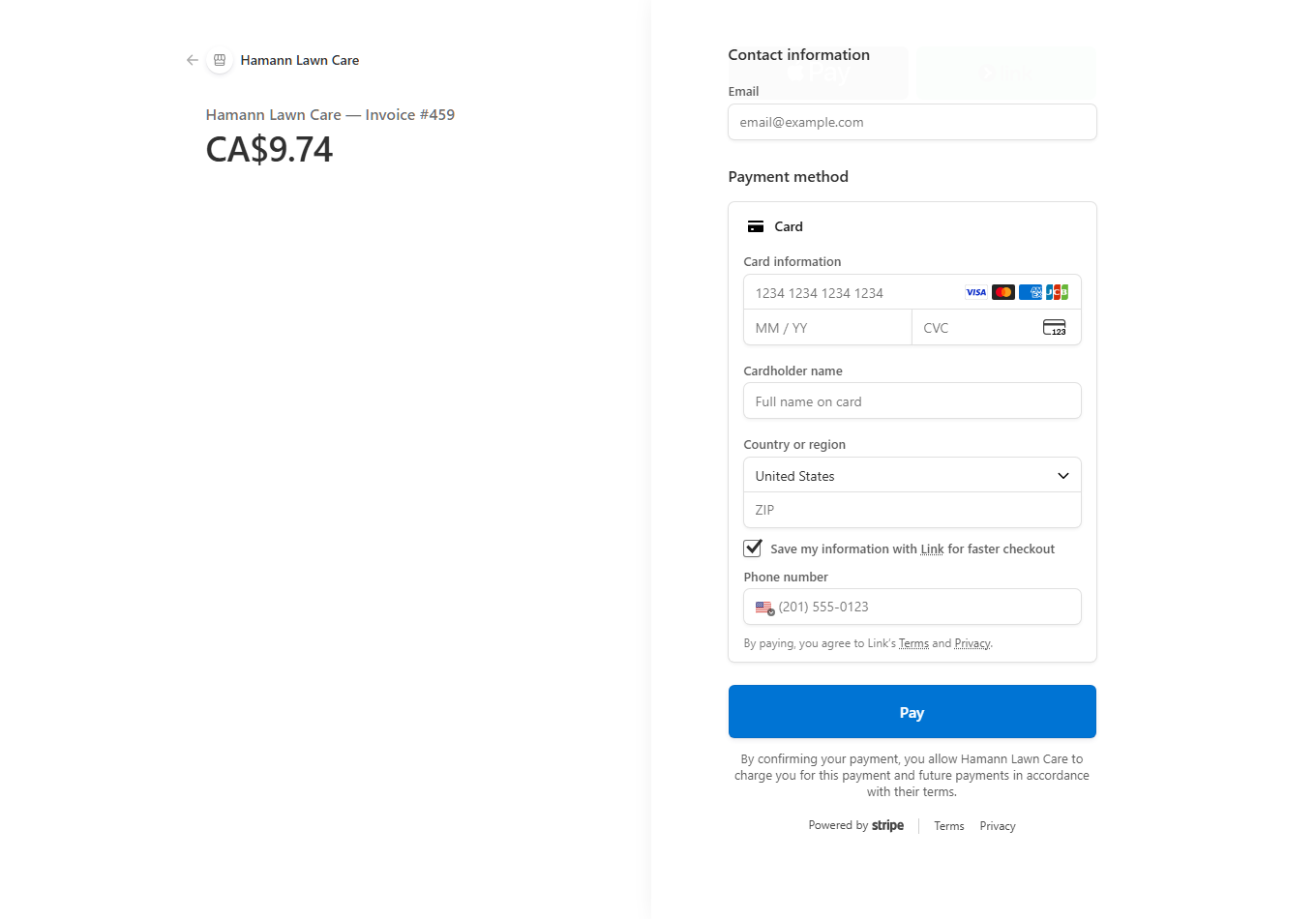
Stripe payment page for Hamann Lawn Care Invoice #459 showing a CA$9.74 total paid in Canadian dollars

A real payment page from the platform — a company with its country set to Canada, and the customer paying in Canadian dollars (CA$9.74, Invoice #459). It's the founder's own company, on the same billing engine FenceBossPro runs on.

A Frost-Shortened Season
Leaves No Room for Lost Days.

When the build window runs roughly thaw to freeze-up, an install that slips through the cracks isn't an inconvenience — it can be revenue that rolls to next year. FenceBossPro keeps every sold job on one board and every crew on a planned day, so the backlog burns down on purpose instead of by memory.

And when the forecast wrecks a day — because it will — you reshuffle on the screen, not in a panic of phone calls. Rescheduled jobs keep their crew notes and materials lists, customers can be alerted automatically, and nothing silently disappears from the plan.

  • Job board from measured → bid → deposit paid → scheduled → in progress → done
  • One-click scheduling with date picker and crew assignment
  • Multi-day builds scheduled around material delivery — set posts one day, hang panels the next
  • Drag-and-drop route ordering between jobs to cut windshield time
  • Reschedule alerts text the customer automatically when a date moves
  • Summary bar: booked jobs, revenue, and linear footage still in the backlog
Thursday — Rained Out, Rebuilt in Minutes
Cedar Privacy — 42 m
Moved Thu → Sat · customer auto-texted
Moved
Chain Link — 73 m
Moved Thu → Mon · materials list intact
Moved
Gate Repair — double drive gate
Kept — short indoor-adjacent job for the crew
Kept
0 jobs dropped
Every moved job keeps its notes, materials, and place in the backlog

The Property Remembers,
So Your Crew Doesn't Have to Ask.

Every address gets its own profile: the fence line, the linear footage, where the gates sit, how the crew gets into the yard, and every job you've ever done there. When the same customer calls back in two years for a repair or a second run, you're quoting from a record — not from whoever's memory survived the winter.

  • Full job history per property — what was built, when, and for how much
  • Materials on record: posts, panels, pickets, gates, and hardware used on the job
  • Gate locations, line notes, and access instructions the crew sees before arriving
  • Photos attached to the job — before, during, and the final walk
  • Clients and open leads side by side, with a pipeline of who to follow up next
  • Notes that stay with the property, not in a text thread that scrolls away
Property Profile
📏
Fence line on record
Runs, linear footage, and fence types
🚪
Gate & access notes
Where the gates are, how the crew gets in
📷
Job photos
Attached to the job, kept forever
🧾
Every invoice & payment
Deposit to final, all in CAD

Your Crews Get Their Day on Their Phone.
The Office Gets Its Day Back.

The crew view is built for someone standing at the fence line with gloves on — big buttons, today's jobs, the route between them, and the materials list for each stop. Mark a phase complete, add a photo, drop a note, and the office sees it the moment it happens.

Role-based access means a crew lead sees their jobs and nothing else — not your books, not your margins, not the whole client list. Unlimited users are included, so every installer gets the app without a per-seat bill.

  • Today's job list with routes and drive order
  • Materials list per job — what to load before rolling out
  • Gate and access notes from the property profile
  • Mark phases complete, attach photos, log notes from the field
  • Hour tracking per job for payroll-ready reports
Crew Lead — Today
Stop 1 — Cedar Privacy
Posts set · photos added · phase marked done
Done
Stop 2 — Chain Link
Materials list on screen · gate code in notes
On Site
Stop 3 — Gate Repair
Route queued · hardware on the truck
Up Next
Try it in the live demo above
The crew app in the demo is the real thing

A $15,000 Fence Deserves a Better
Customer Experience Than a Group Text.

A fence is one of the biggest cheques a homeowner writes all year, and for most contractors the entire customer experience is a phone call and an e-transfer request. FenceBossPro gives your customers their own branded app — no app store, no password, a secure link gets them in from their phone. You flip each feature on or off per customer.

✓See their project and full history — what was done, notes, and photos
✓View and pay invoices from their phone in Canadian dollars — card on file, one-tap Pay Now
✓Get alerts their way — email or app notification — and pick which ones they receive
✓Update their card on file without calling your office
✓Contact you or refer a neighbour who stopped to ask about the fence
✓Leave a review when the final walk goes well

You choose exactly what each customer can see — flip any feature on or off with a single switch.

One Job, Start to Finish, in CAD

This is the whole arc of a Canadian fence job in FenceBossPro — nothing retyped, nothing chased by memory, and every dollar the customer pays in Canadian dollars.

1

Quote Same-Day

Measure the run, build the line-item bid from your parts catalog, and text it before you leave the driveway.

2

Deposit in CAD

Customer accepts on their phone and pays the deposit in Canadian dollars — the job is booked before you order material.

3

Build on Schedule

The install lands on the calendar, the crew gets the materials list and gate notes, and weather moves reshuffle instead of derail.

4

Final Invoice, Paid

Invoice goes out at the final walk, the card on file or a Pay Now link settles it in CAD, and follow-ups chase any balance for you.

One Flat Price. Every Feature.
No “Talk to Sales.”

We've been the customer paying $500–$700 a month for contractor software where every feature was an add-on and every user cost extra. FenceBossPro is one plan with everything in it — the same price whether you run one crew or five.

No contracts. Cancel anytime. The subscription is billed in USD (your bank converts) — your customers always pay you in CAD. Canadian texting numbers are registered with carriers during onboarding.

Canadian Fence Contractor FAQ

The questions Canadian fence companies actually ask us — including the two things most software websites conveniently leave out.

Does FenceBossPro invoice my Canadian customers in Canadian dollars?
Yes — natively, not as a workaround. Set your country to Canada in Company Info and every invoice, card charge, and Pay Now link bills in CAD through your own Canadian Stripe account. Your customer sees a Canadian-dollar total, pays a Canadian-dollar amount, and the money settles into your Canadian Stripe account. There is no currency setting to fight with on each invoice.
Does the rest of the platform work in Canada today?
Yes. Estimates, install scheduling, crew dispatch and routing, client and property records, the crew app, and the customer app all work in Canada right now. You can sign up for the free trial from Canada, load your fence types and parts catalog, and send your first bid the same day.
Is the subscription itself billed in CAD?
No — we're upfront about this one. The from $59/month subscription is billed in US dollars, and your bank converts it at its exchange rate. Your customer-facing billing is fully CAD; the one USD charge is the software subscription itself.
Does automated texting work in Canada?
Yes, with one honest caveat: Canadian carriers require your sending number to be a registered Canadian number, so texting is set up during onboarding rather than being instant the moment you sign up. We register a Canadian sending number with the carriers for you as part of getting started. Email alerts and customer-app notifications work on day one while the number registration completes.
Can I put GST/HST on my invoices?
FenceBossPro lets you set your own tax rates per jurisdiction and applies them to invoices automatically, with tax reports so you can see what you collected. You enter the GST/HST or provincial rate that applies to your business and it is calculated on every invoice from then on.
How does the free trial work?
14 days, full access to every feature, no credit card required to start. If you decide it's not for you, your account simply stops — no charges and no cancellation call. If you keep it, it's from $59/month flat with every feature included and unlimited users.
Is there a contract or a setup fee?
No contract, no setup fee, no per-user fees. Month to month, cancel anytime. One flat price includes the whole platform — estimating, scheduling, dispatch, CAD invoicing, the crew app, and the customer app.

The Ground Thaws.
The Phone Rings. Be Ready.

Start the trial today, load your fence types and parts, and send your first CAD-billed estimate before the week is out. 14 days free, no credit card, no sales call.

Start Your 14-Day Free Trial
No credit card required  ·  14-day free trial  ·  from $59/mo after